
HOME / PLY · SETUP & PLAYSPACE / LOG 2026-10-11
The L-shaped room: how Laser Thief fits levels into awkward floor plans, and where you lend a hand
How Laser Thief fits levels into L-shaped and concave rooms, and where you help out with positioning, manual points and clearing space.
- L-förmig
- ab 3 × 3 m Teilfläche
- stehend
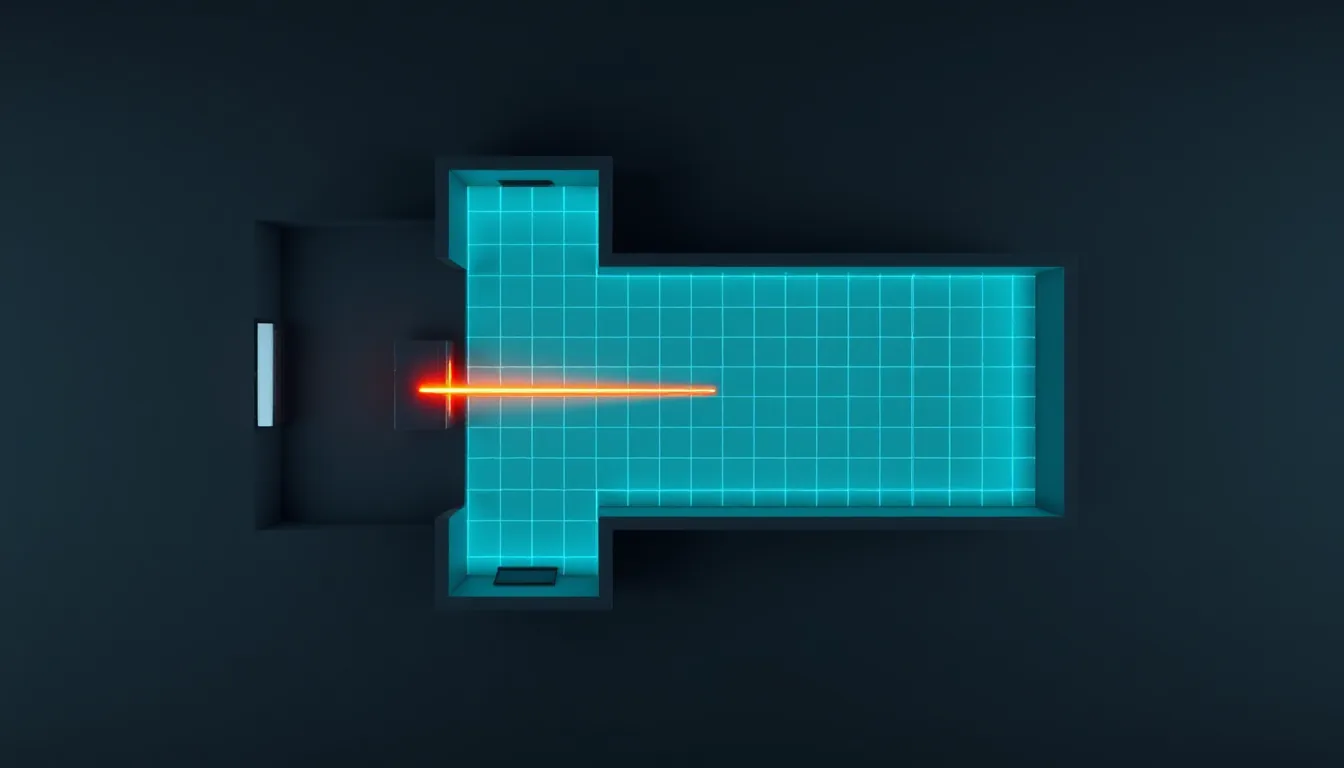
British flats are rarely rectangles. A kitchen-diner with a corner, a bay window, a living room built around a chimney breast: anyone playing room-scale knows the problem of a boundary that ends up looking like a jigsaw piece. Laser Thief is surprisingly relaxed about it. The studio describes fairly precisely how levels are fitted into your floor plan. Here’s what’s going on behind it, and where you can lend a hand yourself.
What the game does, according to the studio
Every level is designed for a 3 × 3 m area, with the start pad at the back and the loot 2.4 m in front of it at a height of 1.05 m. That template has to go into your room. There’s a fitter with clear rules for that:
- Supported rooms: L-shaped and concave rooms. Ceiling height comes from the scan (2.5 m if it’s missing). Furniture under 1.3 m counts as an obstacle.
- Search: The fitter tries four orientations, positions on a 0.2 m grid and one scale per axis.
- Clearances: Pad and loot stay 0.35 m from walls and 0.30 m from furniture, the route 0.25 m and 0.20 m respectively.
- Start proximity: The pad is placed near your current position.
- Fallback plan: If nothing fits, the clearances are gradually relaxed. As a last resort, the level is scaled around the centre of the room.
After that, a solver checks before every level that the route from the pad to the loot and back is doable in your room and for your height.
What that means for an L
An L is essentially two rectangles. The fitter looks for the orientation and position in which the 3 × 3 m level fits best. In practice the level usually ends up in the longer leg of the L, or it’s rotated so that the route from the pad to the loot runs along the long side.
The inner corner of the L is the critical point here. It juts into the room like a pillar. The fitter treats the walls of the corner like any other wall and keeps its clearances. That works, but it assumes the corner is captured cleanly in the scan.
Setup checklist for awkward rooms
- Scan the corner. In Meta Space Setup, check the walls of the inner corner one by one. A corner set incorrectly shifts the whole level.
- Clear the longer leg. It’s the most likely spot for the level. What’s standing here determines how much space is left.
- Choose your starting position. Because the pad lands near your position, before you start, stand in the area where you want to play — specifically at the end where the pad should be.
- Adjust the boundary. The guardian can be awkwardly shaped too. Draw it along the actual free area, not as a rectangle across the corner.
- Play a test level. An early level from the first world shows you how the game uses your room.
Where you lend a hand
Position at the start
The simplest lever is you. Before starting a level, stand in the leg you want to use — specifically at the end furthest from the inner corner. That gives the fitter the best chance of using the full length.
Manual start and goal points
In the settings under ROOM there’s the option “Place start + goal myself” (off by default). With it on, you place the start pad and the loot yourself before a level begins, in every mode. The level is then stretched so that pad and loot land exactly on your points. The points are saved per room.
For an L this is often the better solution: you put start and goal at the two ends of the longest clear route. For the points in Free Mode, the studio gives fixed rules that are a good guide elsewhere too: at least 0.37 m from walls and 0.32 m from furniture, invalid points snap along a glowing outline to the nearest valid point, and the goal needs a clear, straight route from the start. For L-shaped floor plans that means: planning across the corner isn’t a good idea. Put both points in the same leg, or on a straight line that doesn’t cut through the inner corner.
Clearing space rather than hoping
If there’s furniture in the second leg that isn’t over 1.3 m high, the fitter plans around it. That’s correct, but it costs area. If a pouf or a laundry basket can easily move, you’ll gain exactly the area the level needs.
Small room, big room
If the usable area overall is less than about 85% of 9 m², surplus stations are thinned out without losing any mechanics. Gaps that are too tight are widened again (posts 0.45 m, corridors 0.5 m). If the room is big, extra laser walls are added, except in levels 1-01 to 1-08 and in the Dancing Lasers shows.
With L-shaped rooms, either can happen, depending on how much the fitter can actually use. A big L with two narrow legs isn’t necessarily a big room as far as the game is concerned.
What you shouldn’t do
- Don’t drag the guardian across the corner to get more area. The corner is a real wall.
- Don’t disable the boundary. Especially in awkward rooms, it’s your most important protection.
- Don’t plan across furniture. The fitter keeps its distance from furniture, and you should too.
Comfort tips
- In awkward rooms you turn more often. If you start feeling unsure, pause briefly and reorient yourself.
- In mixed reality mode you can see the inner corner directly. For L-shaped rooms that’s the more reassuring choice at first.
- In VR mode, furniture only fades in as glowing edges from 0.6 m away. For tight floor plans that means: MR first, then VR.
You’ll find Laser Thief in the Meta Horizon Store.
Scaler’s take: An L is no problem, as long as the scan is right and you help the fitter. Stand in the right leg, use “Place start + goal myself” for the longest straight stretch, and clear away whatever’s in the way under 1.3 m. Then the game gets more out of an awkward living room than the boundary would suggest.
Linked logs
-
PLY
5 MIN
Space Setup for a heist: scanning your room so the lasers stop at your real walls
Meta Space Setup with Laser Thief in mind: capture walls cleanly, mark furniture properly, check ceiling height and rescan with purpose.
- Raumscan
- Wände bis Decke
- Mixed Reality
-
GBR
7 MIN
Laser Thief, briefed for scalers: what the heist demands of your room, your body and your tracking
The enthusiast briefing on Laser Thief: 3 × 3 m design footprint, poses down to a deep crouch, tracked body parts, MR and VR modes, and every mode.
- 3 × 3 m
- stehend
- Mixed Reality oder VR
-
TEC
5 MIN
Breath control for stealth: the 4-6 rhythm before the laser corridor
A standing pre-run routine: posture, pace and a calm 4-6 breath on the play space before the lasers go live in Laser Thief.
- 3 × 3 m
- stehend
- Room-Scale
-
PLY
6 MIN
Where the rift tears open: understanding wall selection in Sozo and shaping it with your scan
Which wall Sozo picks for the rift, why doors and windows are off limits, and how a cleanly marked scan gives you better arenas.
- Wandscan
- stehend
- Mixed Reality